Critical Analysis
Aiding the Blind & Visually Impaired in Online Shopping
For many blind/visually impaired users, online shopping presents a major challenge to what should be an extraordinarily accessible resource. Shopping online eliminates a plethora of issues that exist with in-person shopping for the visually impaired, an in the ongoing pandemic, allows for a safer way for necessary items to be acquired. In this project, I examined how text-to-speech voice readers aid in helping visually impaired people online shop. I initially began this project with a case-study in which I utilized a text-to-speech program on my laptop, looking for problems with Target’s website. Although I found problems with Target’s website, I also found issues with Apple’s text-to-speech program along the way. This experiment transformed the way I think about online shopping for the visually impaired, for when the tools that are supposed to be helpful break down, it is impossible for impaired users to use the website at all. $10.3 billion worth of online spending comes from visually impaired users, and 2/3 of visually-impaired users abandon online shopping due to the difficulties that arise during the shopping process. Important sites beyond shopping are even hard to access – “80% of news sites “had significant accessibility issues,” while 70% of respondents said they were “unable to access information and services through government websites,” including key sites like Medicare.” (https://www.businessnewsdaily.com/15264-is-your-website-inaccessible-to-the-visually-impaired.html) Businesses could profit even more from updating their sites to be more accessible, and those who are visually impaired deserve have the right to a simple online shopping experience.
PROBLEMS
For the sake of this analysis, I explored one company’s website in particular – Target. Target is a prominent retailer that millions of consumers purchase from, and its site should be able to meet the needs of anyone who wants to shop there. In order to examine the functionality of Target’s website, I conducted a brief case-study, using a voice-to-text speech application on my laptop via Apple. This case-study is inherently flawed because I can clearly see what the computer screen says, and therefore I am only barely scratching the surface of the difficulties that a visually impaired person would go through when utilizing a website. Nevertheless, I was able to identify certain problems with the site.
- The screen-to-text reader skipped over the “Search” bar
For this study, I was only using the text reader that is already implemented in Apple products, which I accessed through Settings and Accessibility. When I read the top text on Target’s website, that contains “Categories”, “Deals”, “What’s New”, “Pickup & Delivery”, the Search bar, and “Sign In”, the screen reader read the Search bar as “Go”. This is a major problem because many visually impaired users utilize the Search bar to more easily find what they’re looking for. Whether this is a breakdown on Target or Apple’s end, the fact that the Search bar was not read out loud, instead spoken as “GO” would make shopping harder for a user who is looking for something specific on the website. This mis-labeled form field hinders the shopping experience for sigh-impaired users and makes online shopping far more difficult for them because they may not instantly recognize “Go” as “Search bar”. Whether this is an issue with Target or Apple’s systems, I think that screen readers should read the screen exactly as it is shown, and not say something different.

- 2. Had to press “Command and S” and highlight the text in order for it to be read
In order for the text on the website to be read aloud, I had to manually highlight the text that I wanted to be read. This seems like a problem on Apple’s front, and perhaps those who are actually visually impaired would have a greater text-to-speech program that automatically reads the text on a website, but if not, the fact that I could only get the program to work because I could see the text that needs to be highlighted is a major issue. Another issue with Target’s pages is that there are a lot of graphics – which screen-readers cannot read unless there is some alt. text under the image.

- 3. Not clearly listing the ingredients on food products
This is a major problem with Target’s website that I identified, and is attributed solely to Target – not an issue with Apple or the screen reader. When I clicked on the first food item that came on the screen (Whoppers Easter Mini Robin Eggs), the ingredients on this product were not clearly listed right away, under the product name. Instead, I had to scroll down to “About This Item”, past Details, and finally click on “Label Info” to be able to read the ingredients. If I was unable to click on this option, and only listened to what the screen reader was telling me, I would have had to listen to many unnecessary things before I could finally hear the ingredients listed. For those who have food allergies/dietary restrictions, knowing the ingredients in an item is absolutely vital. The ingredients were also listed beneath the rest of the nutrition facts, so a visually impaired person would have to listen to the amount of carbs/sugars/etc before hearing the real ingredients in the item.
Despite the ingredients list being difficult to find, the Target website gains accessibility points due to the presence of commas within the ingredients list. Commas are essential to ingredient list readability by text-to-speech readers because they break up the words, and create pauses in between the ingredients, whereas when other sites do not have commas in between the ingredients, the list is read too fast for users to determine between individual ingredients. I did not even consider the presence of commas as an important accessibility staple until watching visually impaired Youtuber Fashioneyesta’s video, “How Accessible is Online Shopping for Visually Impaired People?”. In this video, Fashioneyesta, who is severely sight impaired, shows viewers how she shops online using her screenreader, and highlights the importance of commas in ingredients.
SOLUTIONS
For Target’s website:
- One solution is making Search buttons easier to access, and making sure they are at the top of the screen. For users who are only partially visually impaired/have limited sight, placing the search button in an obvious and clear spot allows them to instantly see it so that they do not have to continually search throughout a website just to find this button. They can then type/speak out loud in accordance with their text-to-speech tools, and find what they’re looking for on the site with much greater ease. For those who are wholly blind, their screen readers would be able to find this button much faster and save the user a lot of time.
- Adding alternative text to images so that images can be read by text-to-speech technology is crucial in aiding online shopping. A rule of thumb for when to know if alt. text should be added to a picture is that if the content of a page would be hindered by an image not being there, there should be alt. text. Adding in this text so that screen readers can function would vastly improve impaired user’s access to sites, making sure the details of an image are there.
- All websites that list the ingredients in a product, from food to beauty products, should use commas in between the ingredients so that screen readers can read them in an organized manner, and users can accurately hear the ingredients being spoken aloud. Making sure that the correct punctuation is used for screen readers is essential to users.
For Apple’s Screen Reader Technology:
- 1. Making it so that the text-to-speech is enabled automatically, instead of having to highlight the text manually, is also essential to aiding in the visually impaired’s online shopping process. If a user cannot see the text, there is no way they would be able to highlight it to be read in the first place.
- 2. Instituting a button on technology such as a laptops that automatically reads text aloud would be extremely useful. Users could then simply press this button so that the contents of their screen would be read aloud. This would simplify the screen-reading process immensely, and be an incredible step forward in normalizing technologies that cater to sight-impaired users.
Examining Competitors – Are Others Doing It Better?
To additionally examine the accessibility of Target’s website, I will be exploring Walmart’s website, one of Target’s main competitors, to see if they are more successful in accessibility for the visually impaired. Putting Walmart’s website through the same scrutiny that I used with Target’s website, let’s see how the two match up.
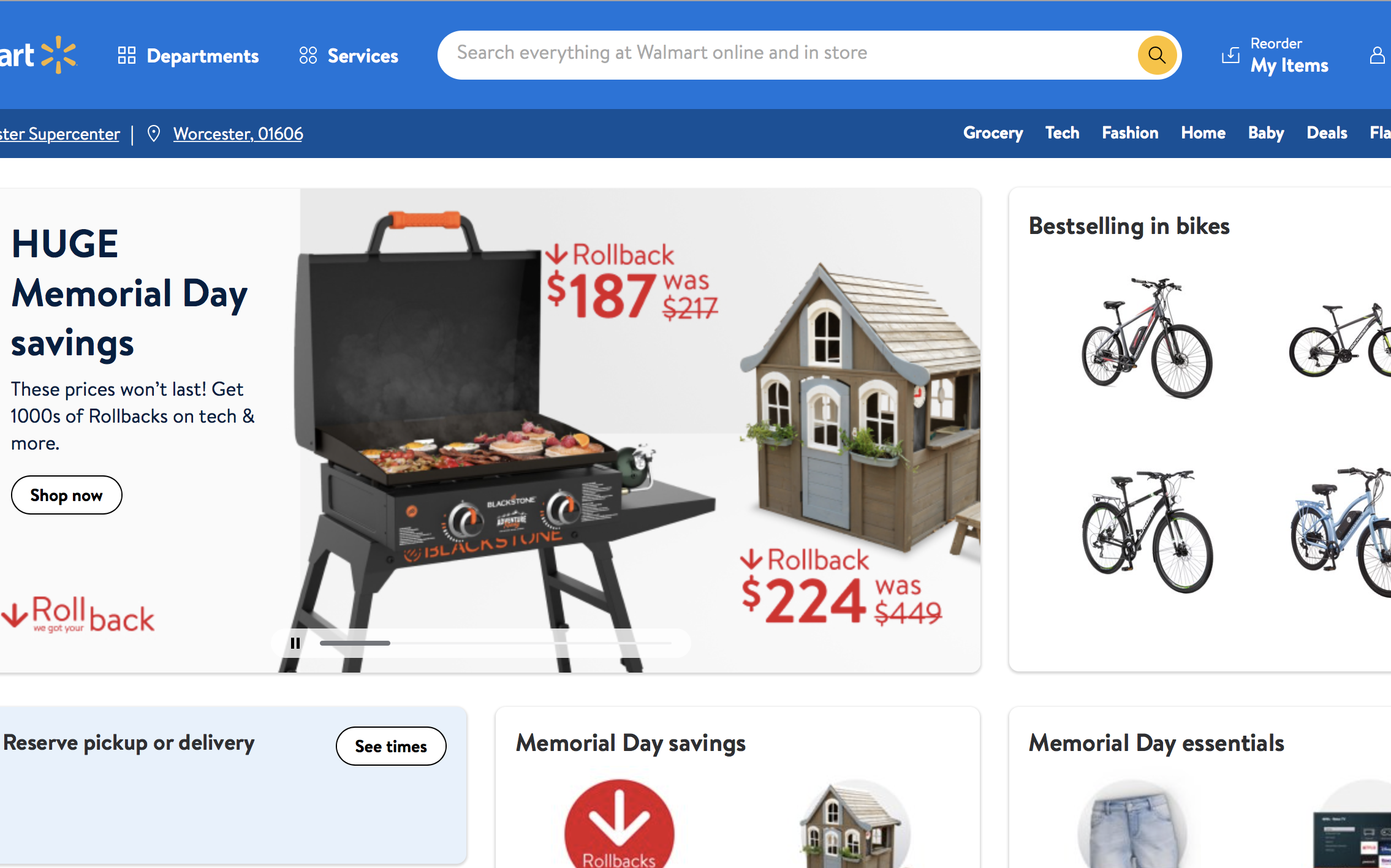
- The screen-to-text reader also skipped over the Search bar. I used the same function that I used for Target, aka the simple screen reader that Apple offers, by pressing Option + S. However, as I realized when I first completed this project, it may be a fault with this screen reading tech, and not the website’s fault. So, I used the more advanced “Voiceover” function in System Preferences. This function worked a lot better, and did allow me to hear the Search bar spoken aloud. When I clicked on various images on Walmart’s website, such as the bikes on the homepage, the Voiceover reader described what was in the image to me. However, this is most likely because it is a product, and the Voiceover tool was just reading the description of the product — there didn’t seem to be because there was alt. text for the image. I did not see any alt. text anywhere on the page. Therefore, I think this improvement (such as reading the search bar) comes from the better, more advanced text to speech tool, and not from the website itself. I am sure that true visually impaired people have much better screen to text readers, but without easily accessible alt. text, there is no way to read/hear what is on the screen. Walmart’s accessibility statement does say that they do have alt text, however I just couldn’t find it.
- A major issue that I had with Target’s website was that some food products did not clearly present their ingredients right below the item, or at least relatively close to where the item is listed without having to scroll much farther down. I also had this concern with Walmart because their ingredients were often the very last thing to be listed on the page. They did put commas between most of the ingredients in their products though, which is a plus.
- Overall page design – Mediocre
Walmart’s site is mainly white, with black text and various images, which makes it easy to read for those who can see somewhat. However, the overall layout is pretty cluttered, and even if the site does have alt. text, it would be pretty overwhelming to hear everything described. Besides this, it is pretty well organized at the top, and the categories are in a spot that makes sense.
Comparing Accessibility Statements – Target v Walmart
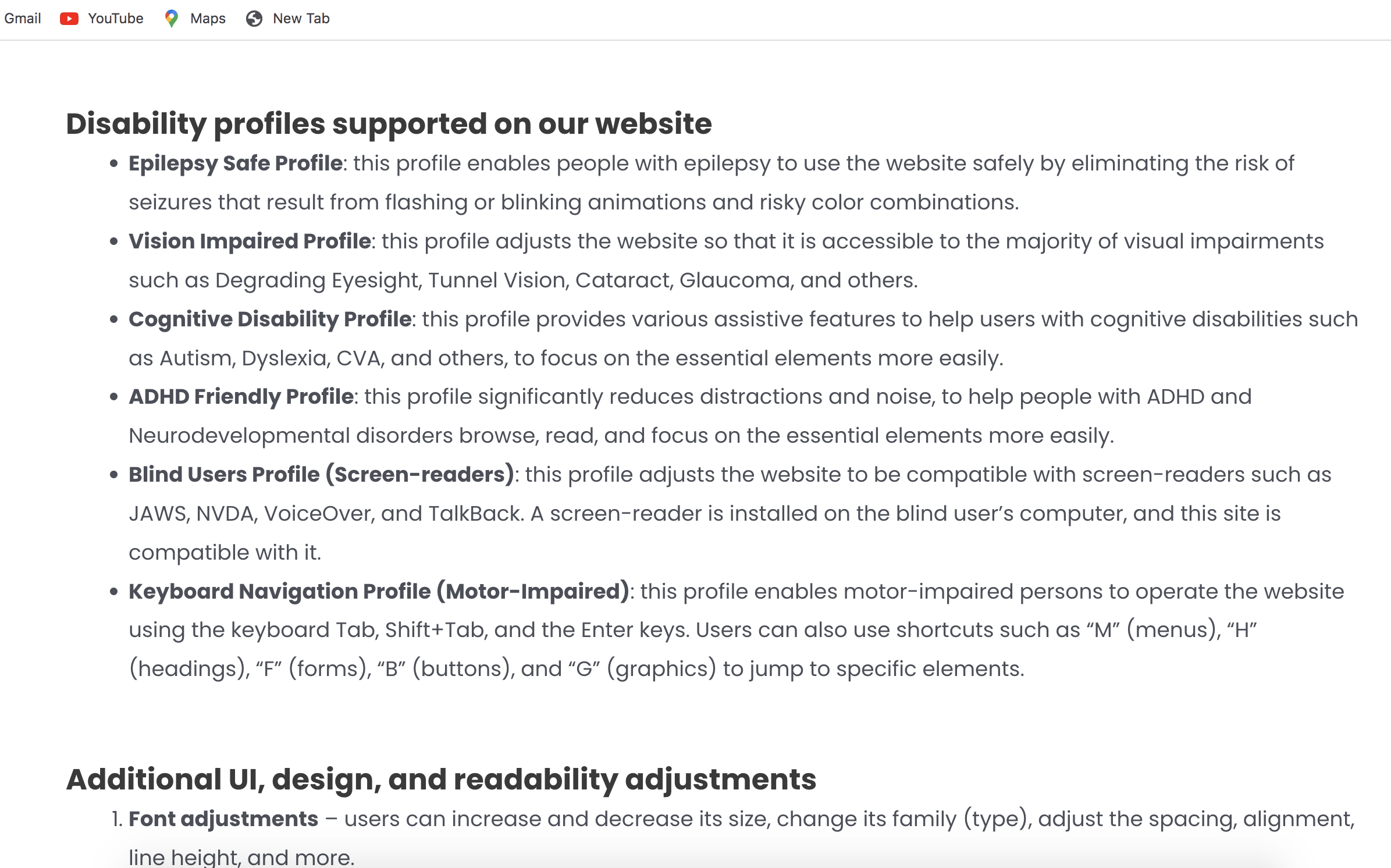
Lastly, I decided to compare the accessibility statements present on both websites. In my opinion, Target’s statement is better (link embedded), as it clearly lists all the steps the company takes toward making the site accessible to all. They also list different disabilities that they cater to.
Walmart did not have as long of a page, simply stating:
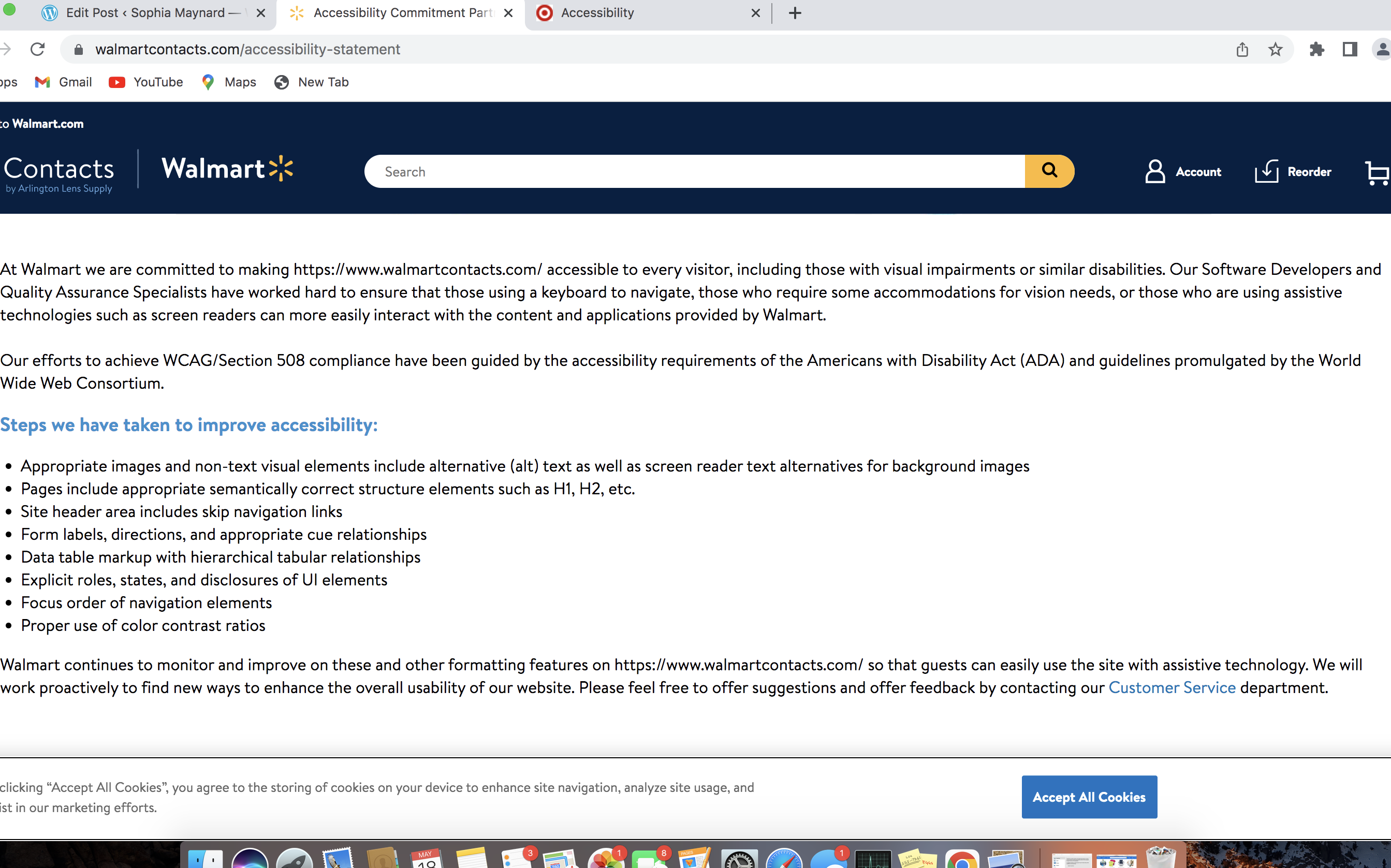
Target’s accessibility statement definitely wins because of the great detail and the listing of the exact steps that they take to improve the website.
Conclusion:
All websites, especially large corporations like Target and Walmart, have a commitment to serving all of their customers with every kind of ability/disability. The accessibility statements by these companies is great, and I think that Walmart should follow in target’s footsteps in expanding their accessibility statement, adding what specifically they are doing to improve their site.
 Sophia Maynard
Leave a comment